Posts mit dem Label SWT werden angezeigt. Alle Posts anzeigen

Montag, 9. August 2010

Dropdown Button for SWT

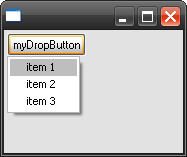
Ever come to that point you needed a button with an menu that pops up after clicking on it? Same like eclipse has in its toolbars? Yes? So i did. But after doing a bit research, nothing suitable came across. So once again i decided to write it myself.

I wanted the behaviour as shown on the picture. You have an ordinary button (with his whole functionallity) and a menu popup.

The code is finished and ready to use. Just use at your own risk ;-)
http://download.planethost.de/code/DropdownButton.java


Update:
A short snippet for the shell shown above:

public class Snippet {

public static void main (String [] args) {
    Display display = new Display ();
    Shell shell = new Shell (display);
    shell.setLayout (new RowLayout ());
    
    SelectionListener sl = new SelectionListener()
        {
        
        @Override
        public void widgetSelected(SelectionEvent e)
            {
            MenuItem mi = (MenuItem)e.getSource();
            System.out.println(mi.getText() + " selected");
            }
        
        @Override
        public void widgetDefaultSelected(SelectionEvent e)
            {
            }
    };
    
    DropdownButton db = new DropdownButton(shell, "myDropButton", SWT.NONE);
    db.addMenuItem("item 1").addSelectionListener(sl);
    db.addMenuItem("item 2").addSelectionListener(sl);
    db.addMenuItem("item 3").addSelectionListener(sl);
    
    shell.pack ();
    shell.open ();
    while (!shell.isDisposed ()) {
        if (!display.readAndDispatch ()) display.sleep ();
    }
    display.dispose ();
}
} 

Tooltip enabled CCombo for SWT

After if did a lot of research about a tooltip enabled combo box in SWT I came across several issue reports in the offical issue tracker. There they stated that there will be no tooltip enabled combo box.
So I decied to do it my own because we had a great need for it. 

Et voilá, here it is:
http://download.planethost.de/code/TooltipCCombo.java

Use at your own risk. Tested with Eclipse 3.6 on Windows and Linux.

 Screenshot from TooltipCCombo in action.


A short snippet for the shell shown above:
import org.eclipse.swt.SWT;
import org.eclipse.swt.layout.RowLayout;
import org.eclipse.swt.widgets.Display;
import org.eclipse.swt.widgets.Shell;

public class Snippet {

public static void main (String [] args) {
    Display display = new Display ();
    Shell shell = new Shell (display);
    shell.setLayout (new RowLayout ());
    
    TooltipCCombo combo = new TooltipCCombo(shell, SWT.READ_ONLY | SWT.BORDER);
    combo.add("first", "first tooltip");
    combo.add("second", "second tooltip");
    combo.add("fourth", "fourthtooltip");
    combo.add("thrid", 2, "third tooltip");
    
    shell.pack ();
    shell.open ();
    while (!shell.isDisposed ()) {
        if (!display.readAndDispatch ()) display.sleep ();
    }
    display.dispose ();
}
}